Posts

Showing posts with the label Compile

Uart3 Serial Port, How to locate the source code used by FreeBSD / GhostBSD-Arm64

Image
 Uart3 Serial Port,  How to locate the source code used by FreeBSD / GhostBSD-Arm64 Edit the file /etc/rc.conf  and  add the bash execution line 'set -x'  This will produce verbose output from  'make buildkernel KERNCONF=GENERIC-VCHIC   -DNO_CLEAN Issue the  'make buildkernel' command and direct stdout & stderr to a file. make buildkernel KERNCONF=GENERIC-VCHIQ -DNO_CLEAN > BRCM64_GENERIC-VCHIQ.txt 2>&1  later you can run make installkernel KERNCONF=GENERIC-VCHIQ ===> wlan_tkip (install) install -T release -o root -g wheel -m 555   wlan_tkip.ko /boot/kernel/ install -T dbg -o root -g wheel -m 555   wlan_tkip.ko.debug /usr/lib/debug/boot/kernel/ ===> wlan_wep (install) install -T release -o root -g wheel -m 555   wlan_wep.ko /boot/kernel/ install -T dbg -o root -g wheel -m 555   wlan_wep.ko.debug /usr/lib/debug/boot/kernel/ ===> wlan_xauth (install) install -T release -o root ...

GhostBSD-Arm64 Future Road Map Ideas to share with present Users.

GhostBSD-Arm64  Future Road Map Ideas to share with present Users.   FreeBSD is where GhostBSD gets upstream sources.  FreeBSD is the parent, but GhostBSD copies and keeps its own repository of source code in packages.  Howto on GhostBSD-Arm64 uses to obtain ghostbsd source code.  Start with a FreeBSD snapshot running Workstation to obtain source code like this: mkdir -p /usr/ghost14 ;  cd /usr/ghost14 git clone  github.com/ghostbsd/ghostbsd-src cd ghostbsd-src;  make buildworld ; make buildkernel KERNCONF=GENERIC-VCHIQ XFCE4.18 is operational on GhostBSD Arm64 Operating System based on FreeBSD Arm64 Tier 1  Freebsd.org/where find a RPI 3/4 snapshot like 13.2 or 14.0 https://download.freebsd.org/releases/arm64/aarch64/ISO-IMAGES/14.0/  https://download.freebsd.org/releases/arm64/aarch64/ISO-IMAGES/14.0/FreeBSD-14.0-RELEASE-arm64-aarch64-RPI.img.xz or  13.2  https://download.freebsd.org/releases/arm64/aarch64/ISO-IMAGES/13.2/...

Creating Ghost14 aarch64 ARM64 boot image from Klara Systems Document

Image
Creating Ghost14 aarch64 ARM64 boot image from Klara Systems Document. update Dec/10/2023 Image credit to Klara Systems Document https://klarasystems.com/articles/building-customized-freebsd-images/   Read and study this document to understand how to build a bootable image. you need 3 partitions for a minimal bootable image: ESP EFI FAT32  need a 50MB-760MB FAT32 filesystem GPT partition for the U-BOOT files needed by the raspberry pi 4B, 3B, 400 hardware  label esp SWAP space 2 GB on the USB Flash drive stick or on a USB SSD disk device label swapfs GhostBSD rootfs /  for the UFS file system to exist for booting the /boot/kernel/kernel image file.   If you 'dd' write this Ghost14_selfbuilt.img to a 16GB or larger USB Flash Drive Stick device,  You may resize the UFS file system to fill up the unused partition with a larger file space to fill up to the drive size. label rootfs Use resize command with the disk name, ada0, ada1 da0, da1 camcontrol dev...

FireFox Aarch64 ARM64 FreeBSD Raspberry Pi 4B, Getting Firefox version 1.20.0_2,2 November 20, 2023

 FireFox Aarch64 ARM64 FreeBSD Raspberry Pi 4B,  Getting Firefox version 1.20.0_2,2 November 20, 2023   Last Update: 2023-11-20 21:32:36 https://www.freshports.org/www/firefox/#history     Documenting what I do NOT KNOW how to do very well.       Getting the latest version of FireFox running on FreeBSD 15.0-CURRENT install to my development system.  Turning off WebGL  with the 'about:config' entry to the search URLs field.   Robonuggie, mentioned this trick to get FireFox not to crash when operating. Fred Finster November 25, 2023  https://ghostbsd-arm64.blogspot.com I opened a URVXT Terminal window under XFCE on the FreeBSD 15.0-CURRENT O/S running my development workstation on a Raspberry Pi 4B with 8 GB dram, HDMI interface to a TV Monitor, and 1 TerraByte SSD connected to the USB 3.0 host port. logged in as user 'fred'.  switch to 'root' user with 'su -' .  cd /root

Poudriere Simple Tips on $PATH, ccache, & Calling Poudriere command line

Image
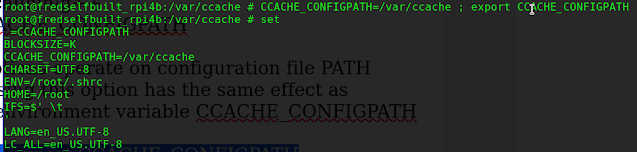
Poudriere Simple Tips on $PATH, ccache, &Calling Poudriere command line  Poudriere Simple Tips Create a Jail  poudriere jail -c -j ghostbsd-14-aarch64 -m src=/usr/ghost14/ghostbsd-src   Bulk build packages from a previously create jail and a package list file  poudriere jail -l  poudriere bulk -j  ghostbsd-14-aarch64 -p ghostbsd_ports -f /usr/local/etc/poudriere.d/pkglist    Bulk build all packages (yes 33,000+) poudriere bulk -j ghostbsd-14-aarch64  -p ghostbsd_ports -a   To create   ghostbsd ports for poudriere poudriere ports -c -p ghostbsd_ports -m git -U "https://github.com/ghostbsd/ghostbsd-ports" -B main To update ghostbsd ports source code to latest main version poudriere ports -u -p ghostbsd_ports -m git -U "https://github.com/ghostbsd/ghostbsd-ports" -B main  

Compiling GhostBSD src code, What I learned Oct 28 2023

Image
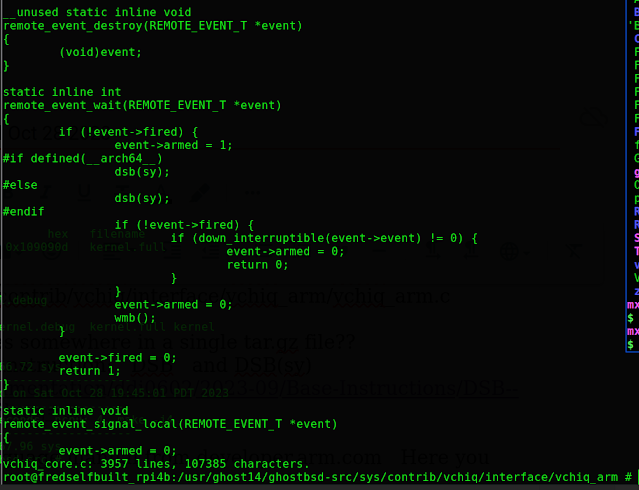
Compiling GhostBSD 14.0 src code, What I learned Oct 28 2023 Not sure if it is STABLE or RELEASE RC3, most likely STABLE source code Get the source code from Github.com/ghostbsd/ghostbsd-src  with this String  I  just finished the Make BuildKernel  compile for Ghostbsd 14.0 on the Raspberry Pi 4B , 8gb hardware running FreeBSD 15.0-CURRENT  ghostbsd-arm64.blogspot.com From Eric Turgeon: by the way, if you want to build ghostbsd from stable/14 you can use: mkdir -p /usr/ghost14 cd /usr/ghost14 git clone -b stable/14 https://github.com/ghostbsd/ghostbsd-src.git   to update sources: cd /usr/ghost14/ghostbsd-src git -C /usr/ghost14/ghostbsd-src pull --ff-only    Build both World and Kernel:  time make -j4 buildworld buildkernel TARGET_ARCH=aarch64 KERNCONF=GENERIC-VCHIQ -DNO_CLEAN  For just building the kernel; cd /usr/ghost14/ghostbsd-src time make -j4 buildkernel TARGET_ARCH=aarch64 KERNCONF=GENERIC-VCHIQ -DNO_CLEAN  I had many errors...

Poudriere setup to compile from GhostBSD 14.0 Stable source code github.com/ghostbsd/ghostbsd-src

Image
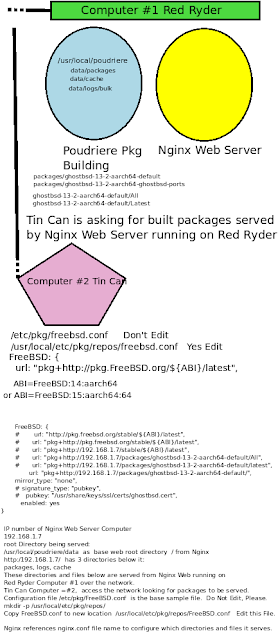
https://man.freebsd.org/cgi/man.cgi?query=poudriere-jail&sektion=8&apropos=0&manpath=FreeBSD+13.2-RELEASE+and+Ports  Poudriere setup to compile from GhostBSD 14.0 Stable source code  github.com/ghostbsd/ghostbsd-src  Will do better on the graphic above. Use  Red Ryder Computer #1 running Poudriere build and running NGINX web server, IP number 192.168.1.7 Tin Can Computer #2  is the client computer looking to install new software pkgs to his base software.  Like  pkg install xorg xfce on his base GhostBSD kernel build 14.0 or 15.0.  IP number 192.168.1.23 REDRYDER Computer #1 files: /etc/pkg/FreeBSD.conf    DON'T EDIT this file at this location. Leave it alone. mkdir -p /usr/local/etc/pkg/repos echo "FreeBSD: { enabled: no }" > /usr/local/etc/pkg/repos/FreeBSD.conf cp -p /etc/pkg/FreeBSD.conf  /usr/local/etc/pkg/repos/GhostBSD.conf  /usr/local/etc/pkg/repos/FreeBSD.conf    Yes, you may Edit thi...