Posts

Showing posts with the label FreeBSD 14.0-CURRENT

ARM64 Boot USB Flash Drive, Hey Buddy can you spare some time? update March 31

Image
update March 31, 2024  ARM64 Boot USB Flash Drive,  Hey Buddy can you spare some time? Reference the Cliche,  from the 1930's " Hey Buddy can you spare a dime "  Which was a whole days wages back then.  Enough to buy food to eat for a day.    Start with a used or new fresh USB Flash Drive.    Use a  shell script file to create 3 partitions    Use same shell script file to tar extract 2 .tar.gz files into 2 of the partitions   gpart status  da1   gpart show -lp  /dev/da1 Remove USB Flash Drive,  Insert into Raspberry Pi 4B, 400, 3B .  Watch HDMI screen,  turn on power  and see GhostBSD Script boot up GPT UEFI Partitions placed on a USB Flash Drive 4 GhostBSD CLI commands to understand your disk drive setup  camcontrol devlist   geom disk list  gpart status   gpart show -lp Need Help  use  the Manual command to read more information:  man gpart ;...
Compiling github Ghostbsd-src source code in October 2023

Compiling github Ghostbsd-src source code in October 2023   on a FreeBSD computer ( Raspberry Pi 4B Freebsd.org/where snapshot ).  Select one to be your stable platform that you use FreeBSD Clang compilers to build GhostBSD from source code into a Kernel.image that you can write a created image file into a USB flash drive with 'dd' command.   https://download.freebsd.org/releases/arm64/aarch64/ISO-IMAGES/13.2/     https://download.freebsd.org/releases/arm64/aarch64/ISO-IMAGES/13.2/FreeBSD-13.2-RELEASE-arm64-aarch64-RPI.img.xz   Use this 13.2-RELEASE  FreeBSD as a platform to compile and build Adventurous and daring,  ready to solve your own problems?  Give 14.0-STABLE or 15.0-CURRENT  https://download.freebsd.org/releases/arm64/aarch64/ISO-IMAGES/14.0/ 15.0-CURRENT aarch64 https://download.freebsd.org/snapshots/arm64/aarch64/ISO-IMAGES/15.0/

Learning ZFS on Root Setup for Raspberry Pi 4B.

Image
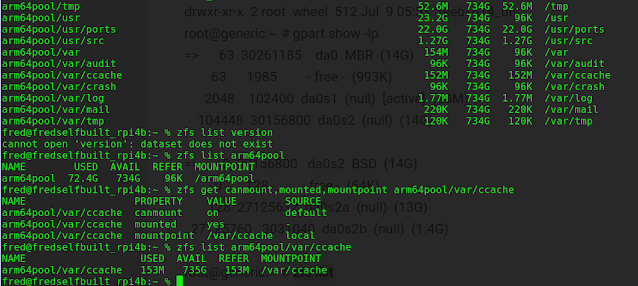
https://openzfs.github.io/openzfs-docs/man/master/8/index.html Learning ZFS on Root Setup for Raspberry Pi 4B. h ttps://www.reddit.com/r/freebsd/comments/v4b5oj/freebsd_on_zfs_on_raspberry_pi/?onetap_auto=true   And now... the scripts! They also live at  https://gist.github.com/jwatzman/8a53dcdd3084d595c6d5918f4a2a0527 . https://twitter.com/finster_fred/status/1680774277224869889?s=20 @linuxhintdotcom  Author - Shahriar Shovon    Thanks for the training you gave me with this ZFS material.  I benefited from your creative web post, to use creating a ZFS install to Raspberry Pi 4B USB SSD  https://ghostbsd-arm64.blogspot.com/2022/09/freebsd-140-compiling-kernel-for.html   Fred's Blog post about installing FreeBSD 14.0-CURRENT onto a USB SSD drive using command 'bsdinstall' https://linuxhint.com/mount-zfs-filesystems-in-different-directoris/ Great explanation and examples of creating a ZFS ZPOOL commands: zpool list zpool import zfs get mounted,canmo...

Poudriere Build setup, update FreeBSD 14.0-CURRENT packages & source code release

Image
 Poudriere,  update Raspberry Pi 4B FreeBSD 14.0-CURRENT packages & source code release  Modified July 29, 2023 Update the Source, Luke.  Before engaging the Drive login to root user account on Raspberry Pi 4B with 8 gigs dram and wired Ethernet connection to internet pkg update pkg upgrade portsnap  fetch update cd  /usr/src git -C /usr/src pull --ff-only  Installing FreeBSD Source Code 14.0-CURRENT to /usr/src Originally download original /usr/src code head for FreeBSD cd /usr git -C /usr clone -o freebsd -b main --depth 1 https://git.freebsd.org/src.git src – https://old.reddit.com/r/freebsd/comments/keme3b/heads_up_freebsd_changing_from_subversion_to_git/ghxggjm/ EXAMPLE: root@generic-arm64:/usr/src # pwd /usr/src root@generic-arm64:/usr/src # cd /usr root@generic-arm64:/usr # git -C /usr clone -o freebsd -b main --depth 1 https://git.freebsd.org/src.git src Cloning into 'src'... remote: Enumerating objects: 98541, done. remote: Counting obje...

GPIO Pins on Raspberry Pi 4B; How to use them in FreeBSD.

 GPIO Pins  on Raspberry Pi 4B;   How to use them in FreeBSD. Useful  RaspberryPi and FreeBSD documentation to help understand UART3 usage on a Raspberry Pi 4B.    Looking to enable and setup UART3 for a serial 9600 baud GPS data stream. https://man.freebsd.org/cgi/man.cgi?query=gpioctl&sektion=8&apropos=0&manpath=FreeBSD+13.1-RELEASE+and+Ports   GPIOCTL  gpio pin control  manual page https://github.com/raspberrypi/utils/blob/master/ovmerge/ovmerge   OVMERGE Tool https://blog.khubla.com/freebsd/understanding-the-raspberry-pi-freebsd-gpio-device    GPIO device understanding blog,  KHubla Blog 2013 , https://github.com/raspberrypi/linux/tree/raspberrypi-kernel_1.20210303-1/arch/arm/boot/dts/overlays/ Latest January 2023  Raspberry Pi firmware from Raspberrypi.com https://github.com/raspberrypi/linux/releases/tag/1.20230106 https://github.com/raspberrypi/linux/tags/ https://lists.freebsd.org/archives/fr...