Posts

Showing posts with the label Poudriere

How to Create and Distribute my own FreeBSD package

 How to Create and Distribute my own FreeBSD package Vermaden has an Excellent article on using FreeBSD Poudriere and setting up NGinx to serve packages.   I wrote a document about learning Packaging,  " Dead Simple Packaging How To "  ' for FreeBSD Dummies' http://ghostbsdarm64.hopto.org/packages/  Dead_Simple_Binary_Packaging_How_To_10 _6C.pdf   PDF Document describing How to Create and Distribute my own FreeBSD package for you to read and learn.  I placed some diagrams in there, to make it easy to understand. http://ghostbsdarm64.hopto.org/packages   my NGINX webserver directory for serving ghostbsd-arm64 packages to the world. http://ghostbsdarm64.hopto.org/packages/Guru_pdf_abiword.tar.gz   Here is source Abiword files for GURU shell script and python application  "Generate_User_Report_for_Upload" application for FreeBSD and GhostBSD. Contents of the file Guru_pdf_abiword.tar.gz $ tar tvf Guru*.gz -rw-r--r-- fred/fred ...
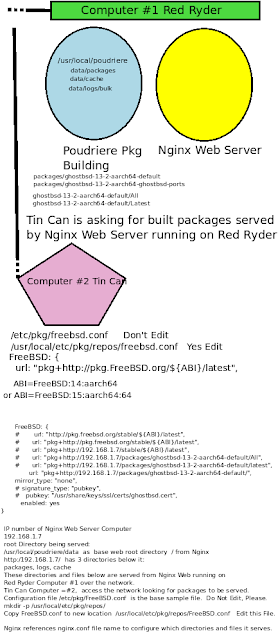
Poudriere setup to compile from GhostBSD 14.0 Stable source code github.com/ghostbsd/ghostbsd-src

Image
https://man.freebsd.org/cgi/man.cgi?query=poudriere-jail&sektion=8&apropos=0&manpath=FreeBSD+13.2-RELEASE+and+Ports  Poudriere setup to compile from GhostBSD 14.0 Stable source code  github.com/ghostbsd/ghostbsd-src  Will do better on the graphic above. Use  Red Ryder Computer #1 running Poudriere build and running NGINX web server, IP number 192.168.1.7 Tin Can Computer #2  is the client computer looking to install new software pkgs to his base software.  Like  pkg install xorg xfce on his base GhostBSD kernel build 14.0 or 15.0.  IP number 192.168.1.23 REDRYDER Computer #1 files: /etc/pkg/FreeBSD.conf    DON'T EDIT this file at this location. Leave it alone. mkdir -p /usr/local/etc/pkg/repos echo "FreeBSD: { enabled: no }" > /usr/local/etc/pkg/repos/FreeBSD.conf cp -p /etc/pkg/FreeBSD.conf  /usr/local/etc/pkg/repos/GhostBSD.conf  /usr/local/etc/pkg/repos/FreeBSD.conf    Yes, you may Edit thi...

Install and Setup NGINX web server on FreeBSD 15.0 aarch64 running on Raspberry Pi

Install and Setup NGINX web server on FreeBSD 15.0 aarch64 running on Raspberry Pi https://vermaden.wordpress.com/2023/04/30/simple-freebsd-poudriere-harvester-guide/ Used the NGINX setup for nginx.conf configuration file   https://vermaden.wordpress.com/2023/08/10/freebsd-on-freeipa-idm-with-poudriere-repo/ Perused this newer custom version August 10, 2023 version https://www.digitalocean.com/community/tutorials/how-to-set-up-a-poudriere-build-system-to-create-packages-for-your-freebsd-servers   Digital Ocean is a good easy start to setting up Poudriere builder.  I started with this first. https://lobste.rs/s/4q9wfy/simple_freebsd_poudriere_harvester   Discussion between ADavis and Vermaden about poudriere setup and use to build packages. https://forums.freebsd.org/threads/questions-about-poudriere-and-ccache.69328/ SevenDogs  setup of CCACHE and TMPFS to decrease build times.  Good Reading https://www.zenarmor.com/docs/freebsd-tutorials/how-to-install-pac...

Poudriere enhancements to CCACHE for compiling GhostSBD-ARM64 source code

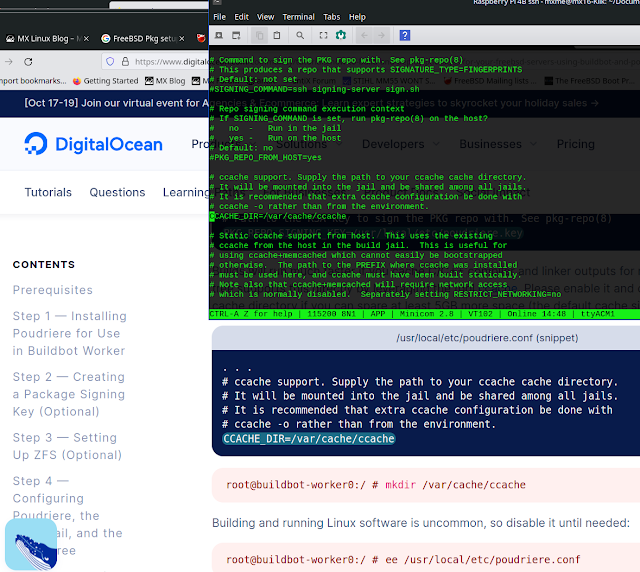
Image
Poudriere enhancements to CCACHE for compiling GhostSBD-ARM64 source code URLS to read and study:  How to get Started with FreeBSD https://www.digitalocean.com/community/tutorials/how-to-get-started-with-freebsd Poudriere setup and configuration https://www.digitalocean.com/community/tutorials/how-to-build-and-deploy-packages-for-your-freebsd-servers-using-buildbot-and-poudriere   BuildBot install and setup https://www.digitalocean.com/community/tutorials/how-to-install-buildbot-freebsd My first blog post about setting up Poudriere for GhostBSD-ARM64 package compiling https://ghostbsd-arm64.blogspot.com/2023/02/poudriere-build-setup-update-freebsd.html   PACKAGESITE setup and VERSION  Freebsd Forums post 70285 https://forums.freebsd.org/threads/packagesite-help.70285/ Use this to set up your PACKAGESITE environmental variable set PACKAGESITE "http://pkg.freebsd.org/freebsd:13:aarch64/latest" export PACKAGESITE   Do not have a trailing slash character at the...