Adding a Magic Probe Debugger to Raspberry Pi 4B
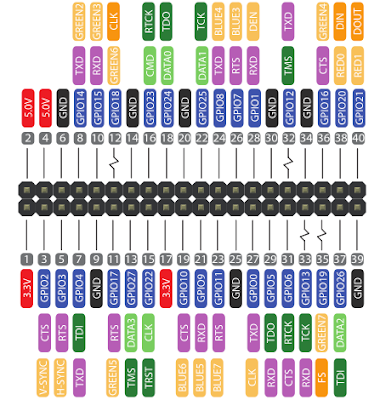
Adding a Magic Probe Debugger to Raspberry Pi 4B First test booting a Raspberry Pi 4B into Single User mode in FreeBSD 14.0 https://www.linux-magazine.com/Issues/2019/223/Desktop-FreeBSD I managed to boot to another drive and edit loader.conf: beastie_disable="NO" loader_color="YES" The beastie_disable="YES" allowed me to boot to single user mode, the loader_color="NO" seems to have enabled more verbosity in the log. It then became apparent it was trying to mount the external USB HDD that I had added to /etc/fstab . Annoying that with beastie disabled it did not give any error. Regardless, I added noauto to the fstab entry and rebooted, but it still failed to mount the drive, so I tried commenting out the entire entry for my hdd. This allowed it to boot to a login prompt. # Disable the beastie menu and color beastie_disable = "YES" loader_color = "NO" https://forums.freebsd.org/threads/...

