Posts

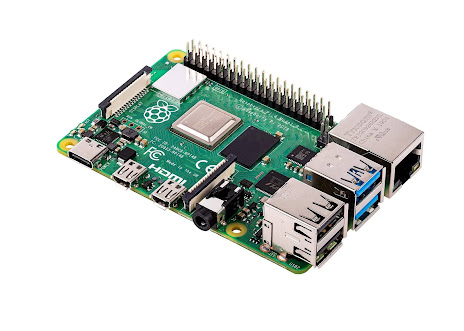
FreeBSD 14.0 Compiling kernel for Raspberry Pi 4B
Image
 FreeBSD 14.0 Compiling kernel for Raspberry Pi 4B in 4 easy steps, updated December 13, 2022 Start with a downloaded RPI image .img FreeBSD snapshot file you can write into a USB Flash drive.   decompress the file with  command:     xz  -dv freebsd_raspi.img Boot  the from USB Flash drive image built from a  Snapshot image   Use the running Snapshot image FreeBSD use "bsdinstall" to download and install FreeBSD, over the ethernet cable connected to your router, to the external usb Hard drive or SSD drive. Shutdown reboot,  remove the USB Flash drive stick from the RasPi4B, reboot from the external usb Hard drive or SSD drive. freebsd.org/where   https://download.freebsd.org/snapshots/arm64/aarch64/ISO-IMAGES/14.0/ Here is the September 9, 2022 FreeBSD 14.0 Snapshot image for RPI 3 or 4, right click on to "save as" a file on your local hard drive.  or use either of the commands:  curl -O https://url_link...

Booting 500 GB SSD on FreeBSD-ARM64-14.0 January 27, 2022 snapshot https://freebsd.org/where

Image
Booting 500 GB SSD on FreeBSD-ARM64-14.0 January 27, 2022  snapshot  https://freebsd.org/where I used Manjaro Linux and the application gparted to manually create several Partitions on the SSD disk drive.  [ USB 3.0 external metal case Hornet Tek ASMT 2235]  Install FreeBSD 14.0 Snapshot RPI3 to USB 3.0 500GB SSD in an external HornetTek metal case Drive enclosure: dd if=./FreeBSD-ARM64-RPI3.img of=/dev/da1p4  bs=1m conv=notrunc  status=progress Look at the location difference between  a single USB Flash drive stick  /dev/da1   and the SDD /dev/da1p4  into a slice (linux primary partition ) versus if  I used /dev/da1 for the whole disk.  So does the U-Boot have logic to do both to boot from a SSD (1.) boot whole drive and then 2.0 boot a single Slice that has 2 partitions 1.) MSDOS FAT32 2.) BSD with a label. ) So I am missing  efibootmrg on  aarch64 Free...

Audit your /boot files with md5deep audit tool

Take the media device that you wrote (with the dd command) the image file fore Raspberry Pi.   Plug that media device (into your development workstation computer)    Make some mount points with 'mkdir' command.  Your setup and O/S might automatically make the mount points and mount the device for you. sudo mkdir /media/da1s1 sudo mkdir /media/da1s2a mount -t msdos /dev/mmcsda1s1  /media/da1s1 mount -t ufs /dev/mmcsda1s2a  /media/da1s2a   Here is the manual page for md5deep   http://md5deep.sourceforge.net/md5deep.html http://md5deep.sourceforge.net/start-md5deep.html   https://en.wikipedia.org/wiki/Md5deep   https://serverfault.com/questions/390522/how-can-i-easily-confirm-in-linux-that-two-separate-directories-have-the-exact-s     While you could hack together a quick script that will calculate individual MD5 hashes for individual files in a directory, the better way to do it would be to use a tool called md5deep whic...

USB tether WiFi network connection to

 Read all the posts at ghostbsd_arm.blogspot.com Figure out how to tether your android cell phone as wifi network connection via usb cable to FreeBSD on Raspberry Pi 4B.  Then you can create a text file that I will add as new blog post at ghostbsd-arm64.blogspot.com https://srobb.net/fbsdquickwireless.html https://docs.freebsd.org/en/books/handbook/advanced-networking/#network-usb-tethering https://wiki.freebsd.org/WiFi/FAQ

Manual Start Wifi with a USB Dongle on Raspberry Pi 4B

Link to Groke post: https://x.com/i/grok/share/CUrXWVrQGq3wkfx5ABlSaua2m My Manual Wifi notes Note that the TP Link TL-WN823N rtl8192eu chip, has driver problems and does not connect with a Wifi Access Point using the wpa_supplicant program. The "ifconfig wlan0 up scan"  does work to view nearby access points. # edit 3 Files to add configuration lines into /boot/loader.conf /etc/rc.conf /etc/wpa_supplicant.conf # for the file  /boot/loader.conf # using Keyboard, change into the 'root' user, before editing.  on a stock FreeBSD snapshot the sudo command is not installed su - root_password #use the ee, nano,or vi editor to edit the file /boot/loader.conf #  pkg  install ee nano vi       ## CLI command to install 3 text editors` #  See an example of manually setting up Realtek RTL8188eu wifi chipset at  https://old-forums.ghostbsd.org   https://old-forums.ghostbsd.org/viewtopic.php?f=64&t=526&sid=4ebd1daaa0dbba22e72a5c18c60...

April 1 2021, config.txt changes Raspi FreeBSD image

Original config.txt Contents https://download.freebsd.org/ftp/snapshots/arm64/aarch64/ISO-IMAGES/14.0/  File to download https://download.freebsd.org/ftp/snapshots/arm64/aarch64/ISO-IMAGES/14.0/FreeBSD-14.0-CURRENT-arm64-aarch64-RPI-20210401-4084b1ab041-245766.img.xz cat /media/BOOT/config.txt [all] arm_64bit=1 dtparam=audio=on,i2c_arm=on,spi=on dtoverlay=mmc dtoverlay=disable-bt device_tree_address=0x4000 kernel=u-boot.bin [pi4] hdmi_safe=1 armstub=armstub8-gic.bin hope@localhost ~/a/april1> ls -l /media/BOOT/config.txt -rwxr-xr-x  1 root  wheel  177 Mar 31 23:41 /media/BOOT/config.txt*   grep config boot*       177  20ab45202003d40ef7b82a0d213745ca  config.txt    Modify config.txt file to match [pi4] #hdmi_safe=1 #overscan_left=1 # 1080p screen  1920x1080 pixel screen size hdmi_group=1 hdmi_mode=16  SUCCESS!  Raspberry Pi 4B with 8gigs booted up. Yeah! Now for setting up a desktop environment, or g...

Download a FreeBSD 14.0 Current version for Raspberry Pi

Image
Download  a FreeBSD 14.0 Current version for Raspberry Pi Here below,  I used Manjaro Linux to download and write an .IMG file to a microSD card.  I have also used GhostBSD.org Operating System as my base development system to do the same thing.   The commands are slightly different to perform the same task.  Like sha256, sha512 commands for GhostBSD and sha256sum, sha512sum for Manjaro Linux. My non functional USB Keyboard problem details, referenced in URLS I see some numbers and text fly by on the HDMI Monitor with Raspberry Pi 4B, yet could not type on the USB keyboard and enter some characters to login at the login prompt.  The keyboard was non responsive.  The February 2021 FreeBSD snapshots did not have the correct start4.elf file. [Bug 253981] USB keyboard doesn't work on RaspberryPi 4. https://bugs.freebsd.org/bugzilla/show_bug.cgi?id=253981 Bug ID: 253981 Summary: USB keyboard doesn't work on... Nabble ( http://freebsd.1045724.x6.na...