Posts

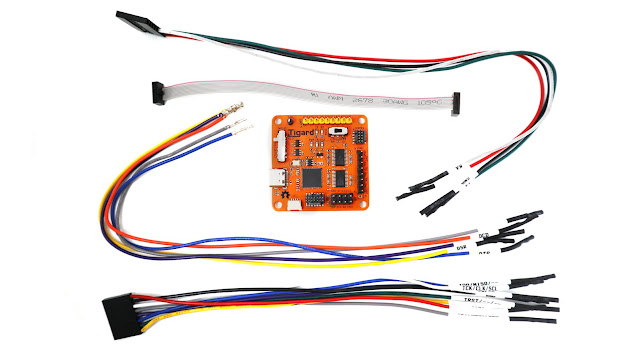
Tigard FT232H Board connectons to a Raspberry Pi 4B for GDB and OpenOCD operation
Image
 Tigard FT232H Board connectons to a Raspberry Pi 4B for GDB and OpenOCD operation https://www.crowdsupply.com https://www.crowdsupply.com/press/tigard   Tigard Board Press Release https://www.crowdsupply.com/securinghw/tigard   Securing Hardware Github directions https://github.com/tigard-tools/tigard    Github hookup directions and source code https://www.electronics-lab.com/tigard-is-here-to-bust-open-any-embedded-physical-interface-you-can-find/   Electronics Lab short write up with GREAT Photo of Tigard Board. https://github.com/tigard-tools/tigard#jtag-debug-on-jtag-or-cortex-header   Github Jtag setup of Tigard board. ( city of Tigard Oregon ) https://embeddedsandbox.com/wordpress/my-raspberry-pi-4-jtag-setup-part-1-introduction/   Part 1 Software, of My Raspberry Pi 4 JTAG setup https://embeddedsandbox.com/wordpress/my-raspberry-pi-4-jtag-setup-part-2-the-hardware-setup/   Part 2 Hardware, of My Raspberry Pi 4 JTAG setup https://pinou...

Uart3 Serial Port, How to locate the source code used by FreeBSD / GhostBSD-Arm64

Image
 Uart3 Serial Port,  How to locate the source code used by FreeBSD / GhostBSD-Arm64 Edit the file /etc/rc.conf  and  add the bash execution line 'set -x'  This will produce verbose output from  'make buildkernel KERNCONF=GENERIC-VCHIC   -DNO_CLEAN Issue the  'make buildkernel' command and direct stdout & stderr to a file. make buildkernel KERNCONF=GENERIC-VCHIQ -DNO_CLEAN > BRCM64_GENERIC-VCHIQ.txt 2>&1  later you can run make installkernel KERNCONF=GENERIC-VCHIQ ===> wlan_tkip (install) install -T release -o root -g wheel -m 555   wlan_tkip.ko /boot/kernel/ install -T dbg -o root -g wheel -m 555   wlan_tkip.ko.debug /usr/lib/debug/boot/kernel/ ===> wlan_wep (install) install -T release -o root -g wheel -m 555   wlan_wep.ko /boot/kernel/ install -T dbg -o root -g wheel -m 555   wlan_wep.ko.debug /usr/lib/debug/boot/kernel/ ===> wlan_xauth (install) install -T release -o root ...

Raspberry Pi OS works, is supported. Why select and use GhostBSD-Arm64?

Raspberry Pi OS works, is supported.  Why select and use GhostBSD-Arm64?   Why would you choose to port FreeBSD (GhostBSD-Arm64) to the Raspberry Pi 4B?  Well I had experience installing & running PCBSD on a x86 laptop in June 2014.  Then I  went back to work and the next time I had time to install PCBSD was October, November 2016, yet there was no PCBSD available then.  Looking around I found https://GhostBSD.org/download and installed GhostBSD.  Networkmgr python app was not working for me.  So I studied about setting up wifi manual using google searches.  I will share forum posts related to that wifi learning experience. https://forums.ghostbsd.org/ucp.php?i=pm&mode=view&f=-1&p=162   Letter Note I wrote about my noob experience with GhostBSD in December 2016. Sorry, but when you are new, you don't have a procedure to follow or know the command names from the very beginning of your journey to knowledge.  Yet,...

HDMI Audio sound patches into GhostBSD source code /usr/ghost14/ghostbsd-src SOLVED Jan20 2024

Image
HDMI Audio sound patches into GhostBSD source code /usr/ghost14/ghostbsd-src   January 19, 2024  SOLVED Jan 20, 2024 Applied the three patches manually: D36431, D37878 ,  D37879      D36431 date was September 2, 2022 D37879 date was December 26, 2022 D37878 date was December 26, 2022 fetch https://reviews.freebsd.org/D36431?download=true wget -c https://reviews.freebsd.org/file/data/cc5gnx6lx7pcvduupcbj/PHID-FILE-ombv7ctfqm3de2dyqgeq/D36431.diff fetch https://reviews.freebsd.org/D37878?download=true wget -c https://reviews.freebsd.org/file/data/bicc7vdmyzwnylvq5soa/PHID-FILE-wc6uoit423pb3lpagwsq/D37878.diff fetch https://reviews.freebsd.org/D37879?download=true wget -c https://reviews.freebsd.org/file/data/ln65jga5vwpz4j2ijmnx/PHID-FILE-cnp5deghq74u3kcfwtxs/D37879.diff Standard update to /usr/src  code to the latest git -C /usr/src pull --ff-only root@usr/src # git -C /usr/src pull --ff-only Already up to date. Go to bottom of this post and read...

January 19, 2024 Howto Download a Raspberry Pi 4B bootable image from http://ghostbsdarm64.hopto.org/packages/

 Download a Raspberry Pi 4B bootable image for a USB Flash drive 16GB or larger size March 6, 2024  update:  use  Feb27_2.img.xz  file http://ghostbsdarm64.hopto.org/packages/    Here is the directory to look at. http://ghostbsdarm64.hopto.org/packages/write_freebsd_img_dd_to_da1.sh   Here is the shell script for GhostBSD / FreeBSD that will download the  FreeBSD-14.0-RELEASE image GhostBSD Feb27_2.img.xz  image file. HDMI Audio will eventually be working  Paste in any URL link to download that file using BSD Fetch command 0.)  Select '0' to download the FreeBSD-14.0-RELEASE CHECKSUM-RPI text file and compare against the FreeBSD-14.0-RELEASE  sha512 checksum value   

January 18 2024 More Random notes on GhostBSD 14.0-STABLE O/S bring up

   January 18 2024 More Random notes on GhostBSD 14.0-STABLE O/S bring up      Be patient and wait for memory checking to complete before blindly typing ctrl-C.   Have fun wildly swinging the mouse arrow cursor around the screen. Sort of Like Pong?   Edit the /mnt/esp msdosfs  config.txt file to modify the video output to fit INSIDE the borders of the screen. overscan_left=100 overscan_right=25 overscan_top=30 overscan_bottom=24 On a Samsung TV you may adjust the video: use the remote "menu" button ---> Picture --> Right arrow button,  Down arrow button to Picture Size --> Enter Button or Right arrow button.   Make your selection " Screen Fit "  Enter Button.  Down arrow button to Position.  Use the 4 arrow buttons to move the picture position around.  When adjusted, Hit Enter ,  Down arrow to "Close" menu Enter Button ,  then Hit Return button or Exit Button.   Happy Fu...